











4K & FHD 60fps Streaming • 1 to 5 Connections Available • 12-Month Plan at $49.99 USD View Plans →
4K & FHD 60fps Live Streaming

Watch Live Sports, Movies & Series in Ultra HD on Eagle4K IPTV

Stream major football leagues, blockbuster movies, and full series across Firestick, Smart TVs, Android TV, and mobile with 1 to 5 connections and 12-month access starting at $49.99 USD.

✓ 12-Month Plan from $49.99 ✓ 1 to 5 Connections ✓ Fast Credential Delivery ✓ Direct WhatsApp Support
Featured Leagues, Sports & Entertainment Channels 4K / FHD 60fps broadcast coverage & EPG guides
Premier League Coverage
UEFA Champions League Coverage
La Liga Coverage
Bundesliga Coverage
Serie A Coverage
Saudi Pro League Coverage
Featured Sports Network
Featured Entertainment Channel
Featured Cinema Channel
Featured TV Network
Featured HD Broadcast Channel
Featured Sports Channel
Featured Live Event Network
Featured Global Channel
Featured Entertainment Network
Featured Premium Network
Eagle4KTV Entertainment Library

Discover Movies, Series & Premium Entertainment Content

Explore blockbuster cinema, binge-worthy series, live sports broadcasts, and family entertainment in crisp 4K Ultra HD, FHD 60fps, and HD across 1 to 5 connections.

Movies & Cinema 4K / FHD

New Releases & Cinema Classics

Watch recent theatrical releases, action hits, thrillers, comedies, and timeless film collections organized by genre and release year.

  • Action, Sci-Fi, Drama & Comedy hubs
  • Smooth playback on TVs & media boxes
  • Regular catalog additions & updates

Series & Boxsets HD / FHD

Complete Seasons & Trending Shows

Catch up on multi-season dramas, crime series, sci-fi sagas, and weekly episode drops with clean season and episode navigation.

  • Season & episode browsing in supported apps
  • Resume watching across screens
  • Great for TiviMate & IPTV Smarters Pro
Live Sports & Events FHD 60fps / 4K

Live Football, Matches & Arenas

Follow international football leagues, championships, combat nights, and live sporting events with high-frame-rate 60fps stream options.

  • Smooth 60fps motion for fast sports action
  • EPG live schedule & match listings
  • Buffering optimization tips included
Kids & Variety 1–5 Screens

Family Cartoons, Docs & News

Keep the whole household entertained with animated shows, nature documentaries, lifestyle channels, and global news across 1 to 5 connections.

  • Watch on Firestick, Smart TVs & tablets
  • Multi-screen plans for busy households
  • Simple setup guides for every room

Unlock Full Access With 12-Month Plans Starting at $49.99 USD

Pick 1 to 5 connections on our pricing page, read our 4K subscription buyer's guide, or chat with us on WhatsApp for fast setup.

Eagle4KTV Plans • 2026

Simple, Transparent 4K Streaming Plans

Choose the duration and number of connections that fit your setup. Every plan includes HD, FHD 60fps, and 4K stream options, EPG guide support, Xtream Codes & M3U credentials, and fast setup assistance.

1 Month Plan

Great for trying out 4K quality & setup

$14.99 / 1 month 1 active connection
  • ✓ 1 Active Connection
  • ✓ 4K, FHD 60fps & HD Channels
  • ✓ Movies, Series & Live Sports
  • ✓ Xtream Codes & M3U Playlist
  • ✓ Firestick, Smart TV & Android

3 Months Plan

Ideal for seasonal sports & series

$24.99 / 3 months 1 active connection
  • ✓ 1 Active Connection
  • ✓ 4K, FHD 60fps & HD Channels
  • ✓ Movies, Series & Live Sports
  • ✓ Xtream Codes & M3U Playlist
  • ✓ Firestick, Smart TV & Android

6 Months Plan

Balanced half-year household access

$34.99 / 6 months 1 active connection
  • ✓ 1 Active Connection
  • ✓ 4K, FHD 60fps & HD Channels
  • ✓ Movies, Series & Live Sports
  • ✓ Xtream Codes & M3U Playlist
  • ✓ Firestick, Smart TV & Android

1. Payment & Activation

Once your payment goes through, your plan duration and selected connection limit (1 to 5 connections) are activated promptly.

2. Get Your Credentials

You receive your Xtream Codes login (Server URL, Username, Password) and/or M3U URL via WhatsApp or order confirmation.

3. Set Up & Stream

Log into your player app—follow our Firestick guide, Samsung & LG TV guide, or Android & Google TV guide—and sync channels & EPG.

4. Ongoing Support

Need help on a device or want to adjust connections? Message our team on WhatsApp anytime for fast setup assistance.

Frequently Asked Questions

How do I get my credentials after payment?

Click any plan button to start a WhatsApp chat with your chosen plan and connection count pre-filled, and our team will send your Xtream Codes / M3U details and setup steps right away.

Which devices and apps are supported?

Your credentials work with TiviMate, IPTV Smarters Pro, IBO Player Pro, and SmartOne across Amazon Firestick, Android TV, Google TV, Samsung, LG, and mobile devices.

Can I read more before choosing a plan?

Yes—read our 4K streaming subscription buyer's guide or check IPTV Smarters Pro vs. TiviMate before picking your plan.

Why Choose Eagle4KTV

Built for Smooth 4K Streaming & Multi-Screen Homes

Everything is structured for reliable playback, fast activation, and clear step-by-step setup across all your favorite living-room and mobile devices.

True 4K & FHD 60fps Quality

Enjoy crisp Ultra HD, Full HD 60fps, and standard HD stream options engineered for live sports, cinema, and daily TV without unnecessary compression.

Anti-Freeze & Low-Buffer Routing

High-capacity streaming nodes keep channel switching snappy and minimize lag during peak match hours and live events.

Works on All Major Devices

Full compatibility with Amazon Firestick, Samsung Tizen, LG webOS, Android TV, Google TV, iOS, Windows, and top apps like TiviMate & IPTV Smarters Pro.

Flexible 1 to 5 Connections

Start with a single screen or scale up to 5 simultaneous connections for the whole household—with transparent 12-month access starting at $49.99 USD.

Fast Credential Delivery

Receive your Xtream Codes login and M3U playlist URL promptly after ordering, backed by clear device-by-device setup tutorials.

Direct 24/7 WhatsApp Support

Never get stuck in slow email ticket queues—message our support team directly on WhatsApp whenever you need help installing or configuring a screen.

Ready to Start Streaming on Eagle4KTV?

Compare 1, 3, 6, and 12-month plans or message us directly on WhatsApp for fast setup help.

Verified Client Feedback

What Our Clients Tell About Us

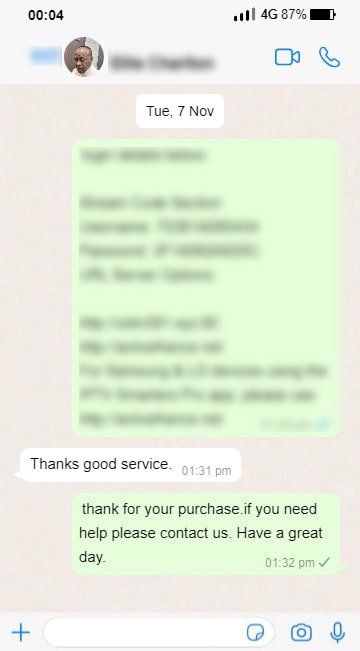
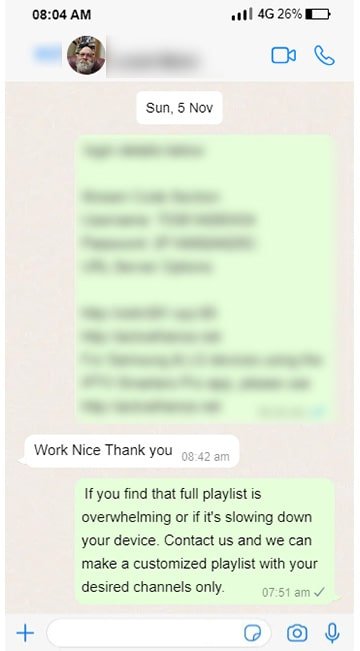
Real WhatsApp conversations and feedback from viewers using Eagle4KTV across Smart TVs, Firestick, Android TV, and multi-screen home plans.

Eagle4KTV WhatsApp client review screenshot 1 Inspect Proof
★★★★★ WhatsApp Proof

Fast Activation & Clear Setup

Clients highlight quick credential delivery and straightforward help getting their playlist running smoothly on their living-room screen.

Verified Chat #1
Eagle4KTV WhatsApp client review screenshot 2 Inspect Proof
★★★★★ WhatsApp Proof

Smooth Picture & Channel Variety

Viewers share positive feedback on stream clarity, responsive channel switching, and having sports, movies, and series in one place.

Verified Chat #2
Eagle4KTV WhatsApp client review screenshot 3 Inspect Proof
★★★★★ WhatsApp Proof

Helpful Direct WhatsApp Support

Subscribers appreciate chatting directly on WhatsApp whenever they switch devices, test a player app, or pick a multi-screen plan.

Verified Chat #3
Eagle4KTV WhatsApp client review screenshot 4 Inspect Proof
★★★★★ WhatsApp Proof

Reliable Multi-Screen Value

Great fit for households comparing plans from 1 to 5 connections and looking for long-term 12-month value starting at $49.99 USD.

Verified Chat #4

Ready to Join Eagle4KTV? Plans Start at $49.99 USD / 12 Months

Choose 1 to 5 connections on our pricing page or chat directly on WhatsApp for fast setup guidance.

Eagle4KTV Help & Answers

Frequently Asked Questions About Plans, Setup & 4K Playback

Everything you need to know about connections, pricing, post-payment activation, supported TV apps, and fixing buffering before or after subscribing.

Our 12-Month plan starts at $49.99 USD, and you can select from 1 to 5 connections on the Eagle4KTV pricing page depending on how many screens or family members watch simultaneously.

Choosing multiple connections lets different devices in your household stream at the same time without kicking each other off. Compare 1, 3, 6, and 12-month options anytime in our 4K streaming subscription plans guide.

Right after your order and payment are confirmed, your subscription duration and connection limit are activated and your playlist details are sent over so you can log into your player app right away.

  • Receive Credentials: Get your Xtream Codes parameters (Server URL, Username, Password) and/or M3U URL.
  • Open Your Player App: Launch your preferred app on your TV stick, Smart TV, Android box, or phone.
  • Load Channels & EPG: Paste your login details, sync the playlist and Electronic Program Guide (EPG), and start watching in HD or 4K.
  • Get Setup Help: Message our team on WhatsApp if you want step-by-step help configuring your first device.

Eagle4KTV works across all major streaming hardware, operating systems, and screens—from budget TV sticks to living-room Smart TVs and mobile phones.

Follow our step-by-step tutorials for Amazon Firestick setup, Samsung Tizen & LG webOS Smart TVs, and Android TV, Google TV & mobile devices.

The best player depends on your device and viewing habits. Android TV and Firestick users often prefer a remote-friendly TV guide interface, while cross-platform viewers often run apps across multiple screens.

Read our full IPTV Smarters Pro vs. TiviMate comparison and check our Top 5 Smart TV Players guide to pick the smoothest 4K player for your setup.

Live sports broadcast at higher bitrates and draw peak traffic, so local Wi-Fi interference, background downloads, or app cache buildup can cause brief stuttering even on fast home internet plans.

Use Ethernet or a clean 5 GHz Wi-Fi band, clear app cache periodically, and follow all six fixes in our guide to stopping buffering and lag during live sports.

Consistent throughput and low latency matter more than peak burst speeds. Standard HD streams typically need around 10–15 Mbps, FHD 60fps benefits from 25+ Mbps, and 4K Ultra HD streams perform best with 35–50+ Mbps per active screen.

If you run multiple connections at once—such as 4K live sports on one TV while another room streams—make sure your router handles multi-device bandwidth evenly.

Yes. Most modern apps—including TiviMate and IPTV Smarters Pro—work cleanly with Xtream Codes (Server URL, Username, and Password) for fast channel and EPG syncing, while other players or custom setups support M3U playlist links.

Yes. Your credentials are not locked to a single brand of hardware—you can configure supported apps on your Firestick, Smart TV, Android box, or mobile device within your plan's active connection limit.

Some Smart TV operating systems restrict certain third-party apps in their built-in app stores. In that case, you can either use an approved Smart TV app listed in our Samsung & LG Smart TV guide or plug in an Amazon Firestick or Android TV / Google TV streaming device.

Channels and EPG schedules refresh automatically through your playlist source. Inside your player app settings, you can also trigger a manual playlist or EPG update anytime if a new channel or schedule change just appeared.

Yes. Whether you want to renew a longer term, upgrade your connection count, or ask which plan fits your household best, check the pricing page or reach out directly on WhatsApp and our team will help you set it up.

Visit the Eagle4KTV Blog Hub to filter and search all seven guides across setup tutorials, player comparisons, buffering fixes, and buying advice.

Still Have a Question Before or After Ordering?

Browse our setup guides, explore 12-month & multi-connection plans, or chat directly on WhatsApp.

Online WhatsApp Support & Orders

Chat Directly With Eagle4KTV on WhatsApp

Order the 12-Month plan ($49.99 USD), ask about 1–5 connections, get your credentials after payment, or request fast setup help for Firestick, Smart TV, or Android.